Tools
How to Put Pinyin on Top of Chinese Characters
The Learner's Dilemma: Reading Chinese Without Pinyin
As a Mandarin learner, you quickly move from a single Chinese word to full sentences. Reading those characters without pronunciation support is slow. What's the sound? What's the tone? Looking up every unknown character in a dictionary breaks the flow of reading.
You need a way to add pinyin on top of the characters — above the Hanzi, not in a separate glossary. That pinyin annotator view is one of the fastest ways to improve reading speed, comprehension, and pronunciation at the same time.
A Free Pinyin Annotator and Generator
The Chinese to Pinyin converter is a pinyin generator for any Chinese word or sentence you paste. It places pinyin with tone marks on top of the characters so you can read the Hanzi and the pronunciation together.
How It Works
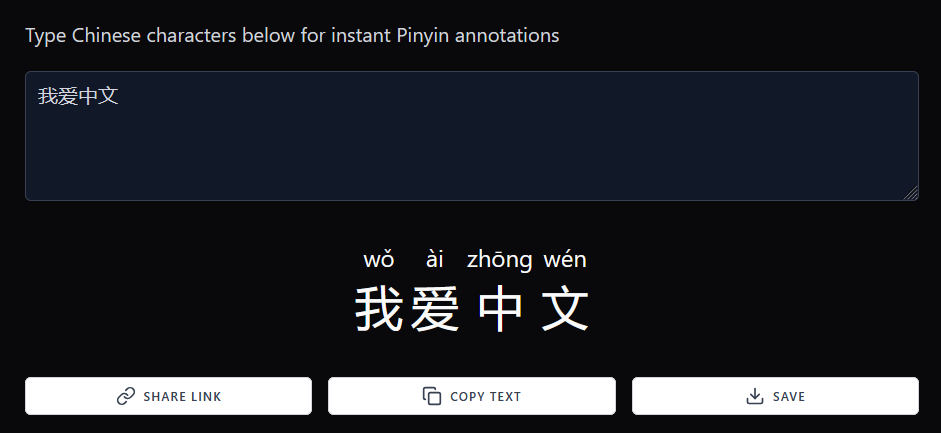
Paste a Chinese word or a longer passage. The annotator processes the text and shows pinyin above each character. For example:
If you enter 我爱中文, the tool displays wǒ ài zhōng wén directly on top of those characters, so you can read the line without leaving the page.
How to Add Pinyin on Top of Characters
You can annotate a Chinese word in a few steps:
- Open the Chinese to Pinyin converter.
- Type or paste the Chinese word or sentence into the input box.
- The generator places pinyin on top of the characters below the input area.
- Use Copy Text to grab a two-line version — pinyin above, characters below — for notes, slides, or flashcards.
Share and Save Your Texts
The converter includes extras that help when you are studying a specific Chinese word or preparing a lesson:
- Share Link: Create a unique URL for the annotated text.
- Copy Text: Copy the two-line pinyin-and-character output instead of retyping tone marks.
- Save Your Work: With a HanyuGuide account, you can save conversions and return to them later.
How This Tool Accelerates Your Learning
- Reinforce Pronunciation: See the tone marks above every character as you read.
- Improve Reading Fluency: Stay in the sentence instead of jumping out to look up each Chinese word.
- Create Study Materials: Generate annotated text you can paste into notes or worksheets.
Bridge the Gap Between Knowing Characters and Reading
Don't let unfamiliar characters slow down your progress. Use the HanyuGuide pinyin annotator to put pronunciation on top of any Chinese word or sentence, then copy the two-line result into your study notes. Try it now and turn raw Hanzi into a readable practice line.
Stop forgetting what you study.
Build recall daily.
Try HanyuGuide's Chinese review system with multiple choice, typed recall, tone-aware practice, and reviews scheduled before memory fades.
Get Yearly · $49.99 / year

Did Google show an error? Sorry about that. Use your email below instead.
By continuing, you agree to our Terms of Use and Privacy Policy.